Document roles
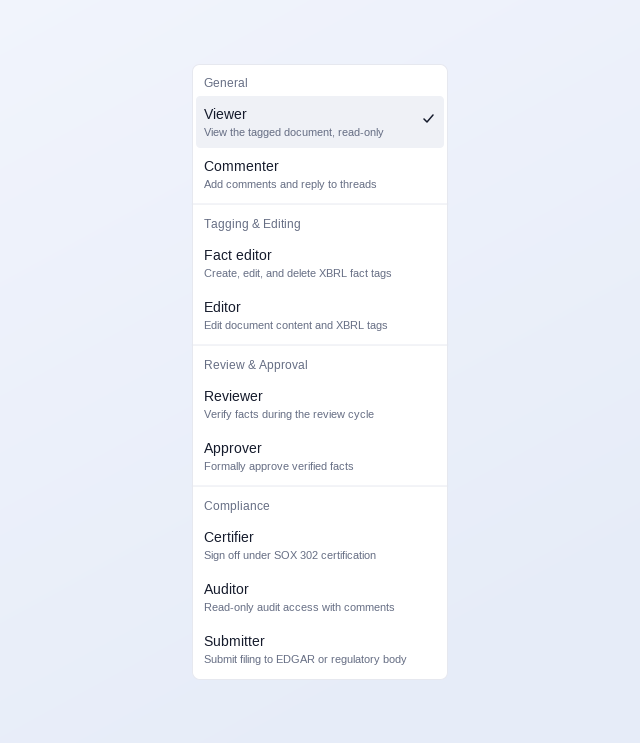
After you build and check the filing, choose document roles before formal review. A document role sets access to one filing. You choose the role in the Collaborate dialog.
Who can do this
The document owner and organization admins manage access. Only they can invite people, change roles and revoke access. A person cannot change their own role.
Before you begin
- You can open Collaborate on the document. See step 1 of Give a client review access.
Choose a document role
| Group | Role | What the role can do |
|---|---|---|
| General | Viewer | View the tagged document. Read-only. |
| General | Commenter | View, and add comments and replies. |
| Tagging & Editing | Fact editor | View, comment, and create, edit and delete tags. |
| Tagging & Editing | Editor | View, comment, and edit content and tags. |
| Review & Approval | Reviewer | View, comment, and mark facts as verified. |
| Review & Approval | Approver | View, comment, and approve facts. |
| Compliance | Certifier | View, approve facts, and certify the filing. |
| Compliance | Auditor | View and comment. Cannot change anything. |
| Compliance | Submitter | View, and submit the filing. |
Check separate limits
Formal review locks content and tag edits for everyone. Only an organization admin can change the filing profile or retry an import.
A Fact editor cannot link a fact to a Source files cell. That action also needs permission to edit content.
The Editor, Approver, Certifier, Auditor and Submitter roles can also see the submissions of the filing.
Manage Source files
Source files access depends on organization membership, not the document role. Full organization members can upload and replace files. Guests have read-only access.
Deletion also needs file ownership or organization admin access. Linked uses can block deletion.
A document share does not grant access to the organization's source library. See Upload and manage Source files.
Open the next task
For how to invite a client, see Give a client review access.
For filing authority, see Send a TEST filing to EDGAR.